Audit
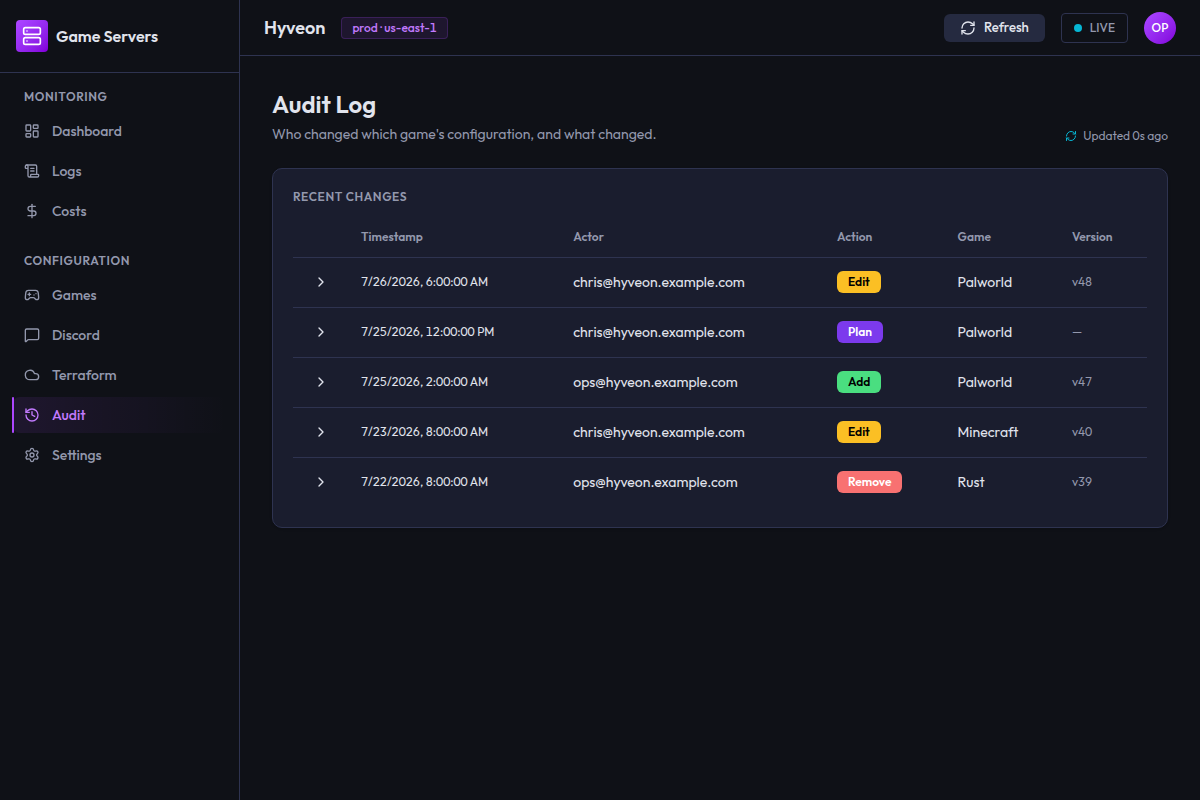
The Audit screen (route /audit) is the record of who changed what.
Who changed which game's configuration, and what changed.
What generates entries
Two kinds of thing are recorded: game configuration writes, and Terraform workspace operations.
| Action | Written when | Game | Before/after |
|---|---|---|---|
add | A game is created from the Add game wizard | The game | null → the new config |
edit | A game is saved from the edit form | The game | Old config → new config |
remove | A game is removed | The game | Old config → null |
plan | A terraform plan run actually starts | (blank) | Both null |
approve | A plan is approved | (blank) | Both null |
apply | A terraform apply run starts | (blank) | Both null |
destroy | A terraform destroy run starts | (blank) | Both null |
rollback | A tfvars rollback is confirmed | (blank) | Both null |
Note that the Terraform entries are written when a run starts, not when it
succeeds. An apply entry means an apply was launched; check
run history for whether it worked.
The four Terraform actions and rollback have no associated game, so their
Game cell is empty and both diff panes read null.
What is not recorded: starting and stopping game servers, Discord
configuration changes, watchdog settings, and anything done outside the app
(editing terraform.tfvars by hand, running terraform from a terminal, or
changing things in the AWS console).
The table
The card is titled Recent changes.
| Column | Contents |
|---|---|
| (unlabelled) | The expand/collapse chevron |
| Timestamp | Local date and time |
| Actor | Who made the change |
| Action | A colour-coded badge. The three game-configuration actions read as add green, edit amber, remove red. The five Terraform actions are coloured by how much they change: plan and approve are both cyan (neither touches infrastructure), apply is amber alongside edit (it mutates), destroy is red alongside remove (both tear down real resources), and rollback is muted grey |
| Game | The affected game, or blank for workspace-wide actions |
| Version | The terraform.tfvars version this write produced, or — |
Newest entries first.
About the Actor column
The actor is the local operating-system username of whoever was running the desktop app — not an AWS identity, not an IAM user, not an SSO login. On a shared machine, or when everyone runs the app as the same user, the column will not distinguish people.
About the Version column
This is the S3 object version ID of terraform.tfvars produced by the write.
It ties an audit entry to an exact file state, and it is what the
rollback feature resolves against.
It requires the S3 tfvars backend with versioning enabled — see
S3 tfvars storage. If you keep terraform.tfvars on the
local filesystem, this column is em-dashes for every row, because there is
no version to record.
approve entries never carry a version. plan and apply carry one only if
the run recorded it. rollback always carries the version it restored.
The before/after diff
Click the chevron on any row to expand it. A panel opens underneath, spanning the full table width, with two panes:
| Pane | Contents |
|---|---|
| Before | The game's configuration prior to the change |
| After | The configuration after it |
Both are pretty-printed JSON. An absent side renders as the literal word
null — so an add has null on the left, a remove has null on the
right, and the workspace-wide actions have null on both.
Two side-by-side columns on a wide window; stacked vertically on a narrow one.
There is no added/removed colouring, no key-level comparison, and no syntax highlighting — you compare the two blobs by eye. For a small change (a port, a memory value) that is fine. For a large edit, expect to scan.
Long lines scroll horizontally within their pane. Expansion state is per-row and resets when you leave the page, but survives pressing Load more.
Pagination
25 entries per page. Load more appends the next 25 and disappears when there are none left. There is no filter, no search and no date-range picker.
Empty and error states
| Situation | Copy |
|---|---|
| Loading | Loading… |
| Initial fetch failed | Could not load the audit log. |
| No entries | No audit entries yet. |
| Load more failed | Could not load more audit entries. below the table, with existing rows still visible |
If the audit table has not been deployed, the page shows the empty state
(No audit entries yet.) rather than an error — by design, so a pre-audit
deployment does not look broken. Writing an audit entry is best-effort and
never blocks the operation it is recording, so a missing table means changes
succeed silently unrecorded rather than failing.