Games
The Games screen (route /games) is where you declare what servers exist. It
is the app's editor for the game_servers map in terraform.tfvars.
Creating, editing or removing a game only rewrites terraform.tfvars.
Nothing changes in AWS until a Terraform apply.
Adding a game does not create a task definition. Removing one does not delete anything — the deployed task definition, EFS access point and security-group rules stay live. Editing CPU or ports does not touch the running server.
Every one of those changes is inert until you go to Terraform and run plan → approve → apply.
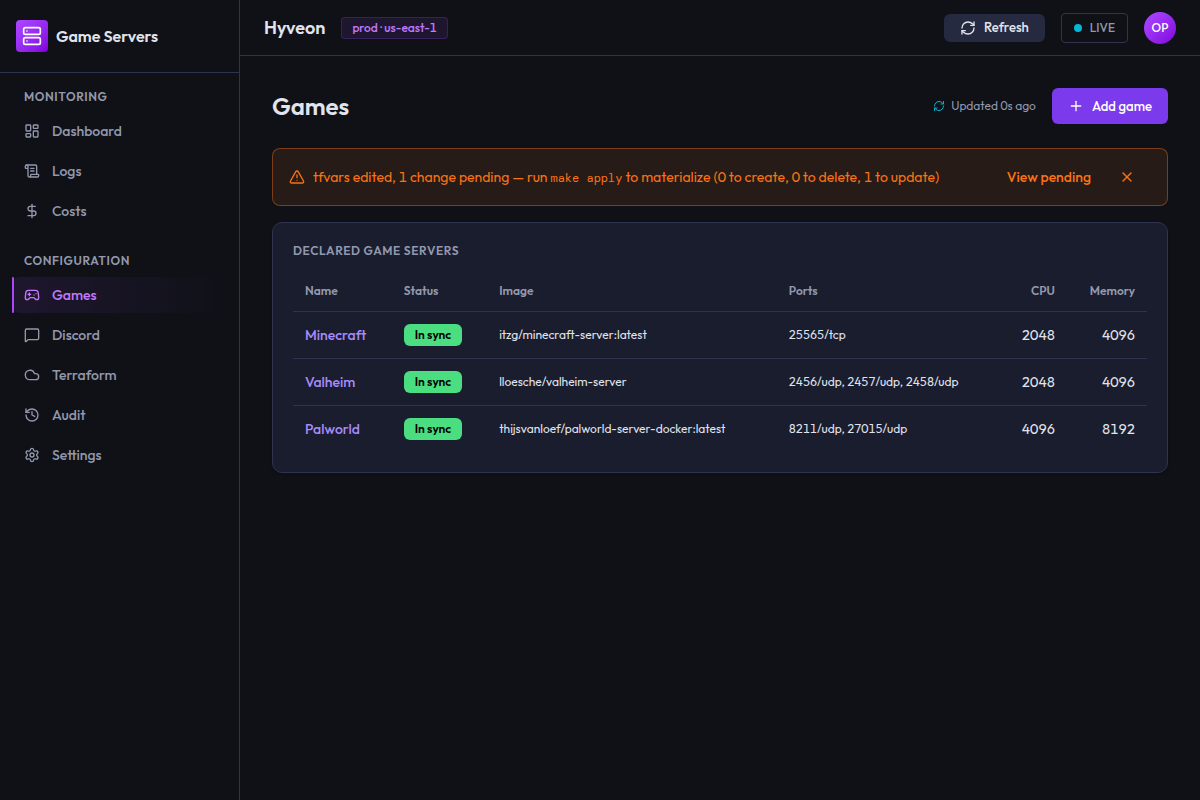
The games table
The card is titled Declared game servers. One row per game, listing everything declared in tfvars first, then anything deployed but no longer declared.
| Column | Contents |
|---|---|
| Name | The game name, linked to its detail page |
| Status | One chip — see below |
| Image | The container image, or — |
| Ports | 25565/tcp, 25575/tcp, or — |
| CPU | Fargate CPU units, or — |
| Memory | MiB, or — |
The table has no sorting and no filter box. Only the name cell is clickable — clicking elsewhere in the row does nothing.
The page fetches once when you open it. Navigate away and back to refresh it.
Status chips
Exactly one chip per game.
| Chip | Meaning | Cause |
|---|---|---|
| In sync (green) | Declared in terraform.tfvars and present in the applied Terraform state | Normal, healthy |
| Pending deploy (amber) | Declared in tfvars, not yet in the applied state | You added or changed it but have not applied yet |
| Undeclared (red) | In the applied state, but no longer in tfvars | You removed it from tfvars but have not applied the removal |
"Undeclared" is the one that surprises people. It means the game is still live in AWS — its task definition, EFS access point and log group all still exist and can still be started — but there is no declaration for it any more. The usual cause is having pressed Remove game without running a Terraform apply afterwards.
Because there is no declaration, an undeclared row has no config to show: its
Image, Ports, CPU and Memory columns are all —. Applying a Terraform plan is
what actually tears it down.
The pending-changes banner sits above the table and summarises the same drift in counts.
Adding a game
Add game opens a five-step dialog titled Add a game server, with the
current step shown as Step 1 of 5: Identity.
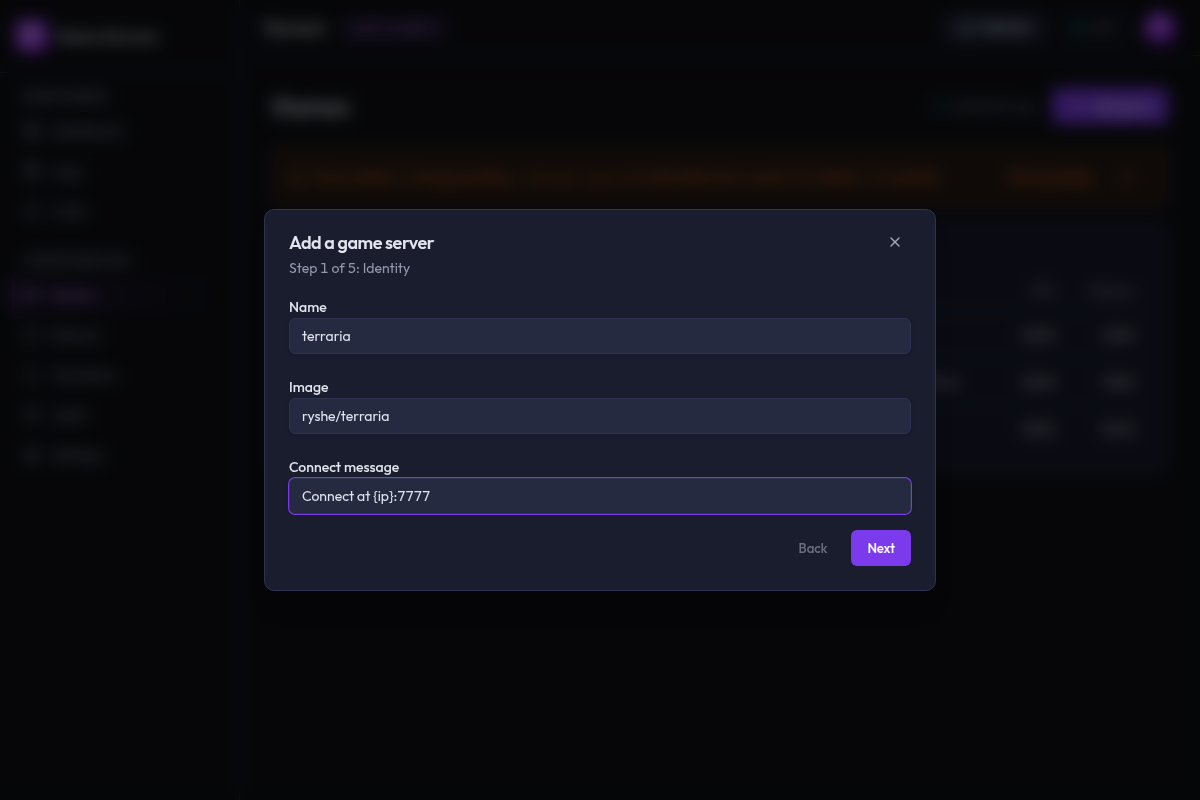
Step 1 — Identity
| Field | Example | Rules |
|---|---|---|
| Name | minecraft | Required. Must start with a letter or underscore and contain only letters, numbers, underscores and hyphens. Must not duplicate an existing declared game |
| Image | itzg/minecraft-server | Required |
| Connect message | Connect at {ip}:25565 | Optional. Only the placeholders {host}, {ip}, {port} and {game} are allowed |
The name becomes the Terraform map key, the task-definition family
({name}-server), the log group (/ecs/{name}-server) and the DNS label —
which is why it is validated as an identifier and why it cannot be changed
later.
Step 2 — Resources
Two dropdowns, no free text: CPU (vCPU units) and Memory (MiB).
Fargate only accepts specific CPU/memory pairings, so the memory dropdown is disabled until you pick a CPU and is then rebuilt from that choice. Changing the CPU after the fact resets the memory if the current value is no longer valid for the new tier.
| CPU units | Valid memory (MiB) |
|---|---|
| 256 | 512, 1024, 2048 |
| 512 | 1024 – 4096, in steps of 1024 |
| 1024 | 2048 – 8192, in steps of 1024 |
| 2048 | 4096 – 16384, in steps of 1024 |
| 4096 | 8192 – 30720, in steps of 1024 |
| 8192 | 16384 – 61440, in steps of 4096 |
| 16384 | 32768 – 122880, in steps of 8192 |
1024 CPU units is 1 vCPU. Because the dropdowns are generated from this table, the wizard cannot offer you an invalid pairing.
Step 3 — Networking
Declare every container port the server listens on.
Starts empty. Add port appends a row with a Container port number
field and a Protocol dropdown (TCP / UDP, defaulting to TCP). Each row
has its own Remove button.
Two collision checks run continuously:
- Against the other ports in this same game:
Port 25565/tcp collides with ports[0] in the same game server. - Against every other declared game:
Port 25565/tcp collides with existing game "minecraft".
Both are hard blocks. Note that zero ports is technically allowed by the wizard — you can advance without adding any — but a server with no declared ports will not be reachable.
Step 4 — Storage
Two sections.
Volumes — "Every game server needs at least one EFS-backed volume for its
save data." Each row has a Volume name (e.g. data) and a Container
path (e.g. /data). The path must be absolute. The Remove button is
disabled once only one row remains; you cannot go below one volume.
File seeds — "Optional — files written into a volume the first time the server starts." Each row has:
| Field | Purpose |
|---|---|
| Path | Absolute path inside the container, e.g. /data/config.yml |
| Content | Plain-text file contents |
| Content (base64) | Base64-encoded contents, for binary files |
| Mode | Unix mode, e.g. 0644 |
File seeds can be removed down to zero. Blank fields are dropped entirely rather than written as empty strings.
Step 5 — Review
A read-only summary in four cards — Identity, Resources, Networking, Storage — showing exactly what will be written. The Storage card lists file-seed paths only; contents are never displayed.
The footer button reads Submit.
On success you get a minecraft created toast and are taken straight to the
new game's detail page. The game appears in the table as Pending deploy
until you apply.
How validation behaves
Errors appear as you type, not on blur or on submit. Next is disabled whenever the current step has any error; problems on other steps do not block you until you reach them.
On the Review step, Submit is disabled unless the whole draft is clean.
If the server rejects the submission, the dialog stays open with your draft intact and jumps to whichever step the first problem belongs to, with the message rendered against the offending field.
Fields the wizard does not cover
The wizard has no controls for https or environment. A game created here
gets neither. Add them by editing terraform.tfvars directly — see the
Terraform variables reference.
The game detail screen
Clicking a name opens /games/:name.
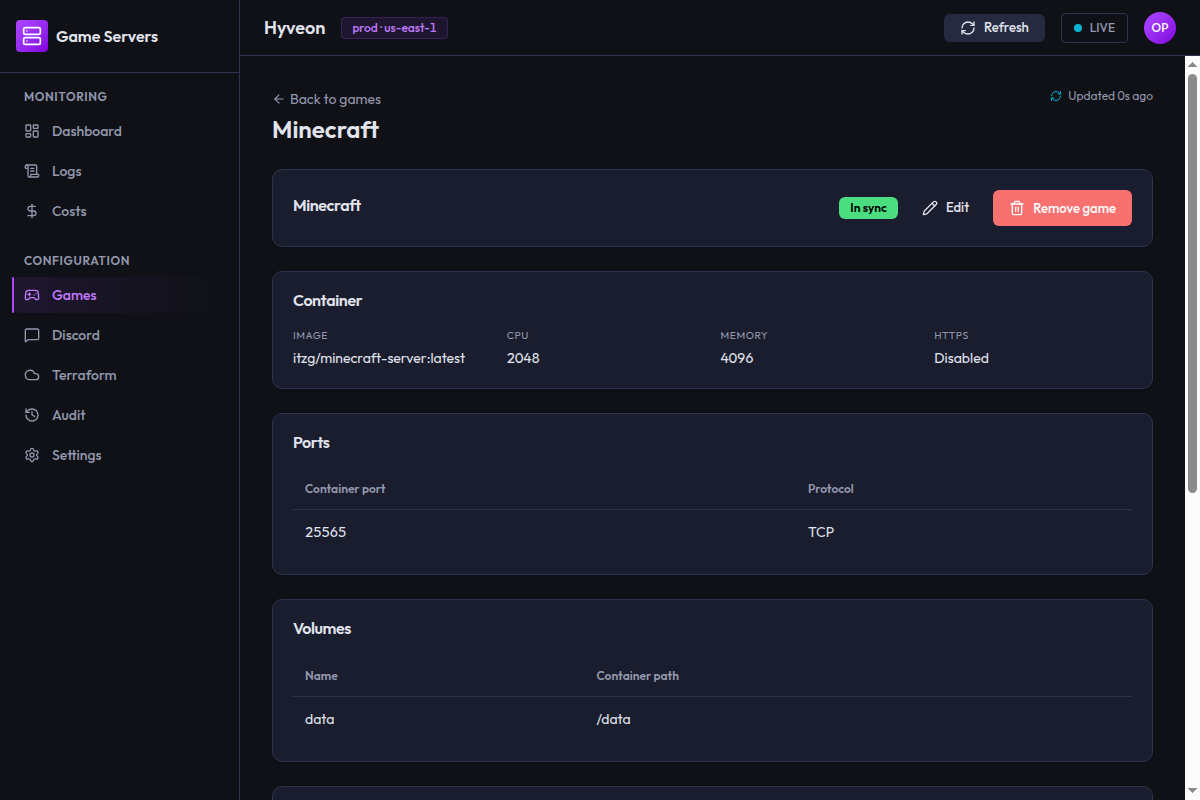
The header carries the game name, its status chip, and — for declared games — Edit and Remove game buttons. Below that:
| Card | Contents | Shown |
|---|---|---|
| Container | Image, CPU, Memory, HTTPS (Enabled / Disabled) | Always |
| Ports | Container port and protocol per row | Always |
| Volumes | Name and container path per row | Always |
| Environment variables | Name/value pairs | Only if any are declared |
| File seeds | A collapsed 3 files seeded at task start summary; expand for the paths (and modes). Contents are never shown | Only if any are declared |
| Connect message | The raw message template | Only if set |
The ghost-entry variant
If you open the detail page for an Undeclared game, none of those cards appear. Instead:
This game is deployed but has no entry in
terraform.tfvars— there is no declared configuration to show.
Edit and Remove game are not rendered at all, because there is nothing in tfvars left to edit or remove. The way to clean it up is to run a Terraform plan and apply, which destroys the orphaned AWS resources.
If you navigate to a name that exists in neither place you get
No game named "foo" was found.
Editing a game
Edit replaces the detail cards with a flat form containing the same four sections as the wizard — Identity, Resources, Networking, Storage — pre-filled from the current declaration. All the same validation applies, but it applies to the whole form at once rather than step by step.
The Name field is disabled. Renaming a game is a delete-and-recreate, not an update: the name is the task-definition family, the EFS access-point key, the log-group name and the DNS label. Remove the old game and add a new one if you need a different name.
https and environment have no controls here either, but they are carried
forward unchanged — editing a game will not silently drop them.
Above the save button:
Saving only updates
terraform.tfvars— visit Terraform to apply this change to the live server.
Save changes writes the file and returns you to the read-only view with the new values. Ports declared in this form are checked against every other game, so a game never collides with itself.
Removing a game
Remove game opens a confirmation dialog:
Remove minecraft?
This deletes the
minecraftentry fromterraform.tfvars. The deployed AWS resources stay live until an operator applies the change from the Terraform page.
Below the text is a single input whose placeholder is the game's own name. You must type the game name exactly — the match is case-sensitive and untrimmed — before the Remove game button becomes clickable.
On success you get minecraft removed from terraform.tfvars and are returned
to the games list, where the game now shows as Undeclared until you run a
Terraform apply.
Concurrent-edit conflicts
If you store terraform.tfvars in S3 (see S3 tfvars storage),
the app can guard writes with an optimistic-concurrency check: the write
carries the object version the app last read, and S3 rejects it if someone
else has written since. That surfaces as:
Optimistic lock failed: expected etag "abc123" but remote is now "def456".
There is no automatic retry. Reload the games list to pick up the newer state and redo your change.
Two honest caveats about this mechanism as it stands:
- In local-file mode there is no guard at all. A plain filesystem
terraform.tfvarshas no version to condition on, so the last write wins. - The app's own screens do not currently opt in. The wizard, the edit form and the remove dialog all issue unconditional writes, so in practice you will not see this error from the UI today. The plumbing exists end to end and is exercised by the test suite; the UI simply does not send the expected version yet. If two people are editing the same tfvars concurrently, treat it as last-write-wins and coordinate out of band.